Example · C++ · Version 2.0.0
Velodyne VLP-16 Lidar Viewer#
Receive Velodyne VLP-16 packets over UDP or from a pcap recording, build a rolling point cloud on the GPU, and view it from a fixed top-down or chase camera on Holoscan 5.x.
| Authors | Holoscan Team (NVIDIA), nvMap Team (NVIDIA), nvMap Embedded Team (NVIDIA), Tom Birdsong (NVIDIA), Julien Jomier (NVIDIA), Jiahao Yin (NVIDIA), Marlene Wan (NVIDIA) |
|---|---|
| Supported platforms | x86_64, aarch64 |
| Language | C++ |
| Version | 2.0.0 |
| Compatibility | HSDK 5.0 |
| Contribution level | Level 4 · Code of unknown quality |
| Source | holoscan-applications |
This application receives Velodyne VLP-16 lidar packets, converts them to a rolling Cartesian point cloud on the GPU, and displays the cloud from a fixed top-down or chase camera. It supports live UDP, recorded pcap, and synthetic input with Holoscan SDK 5.x. All operators are in this application directory.
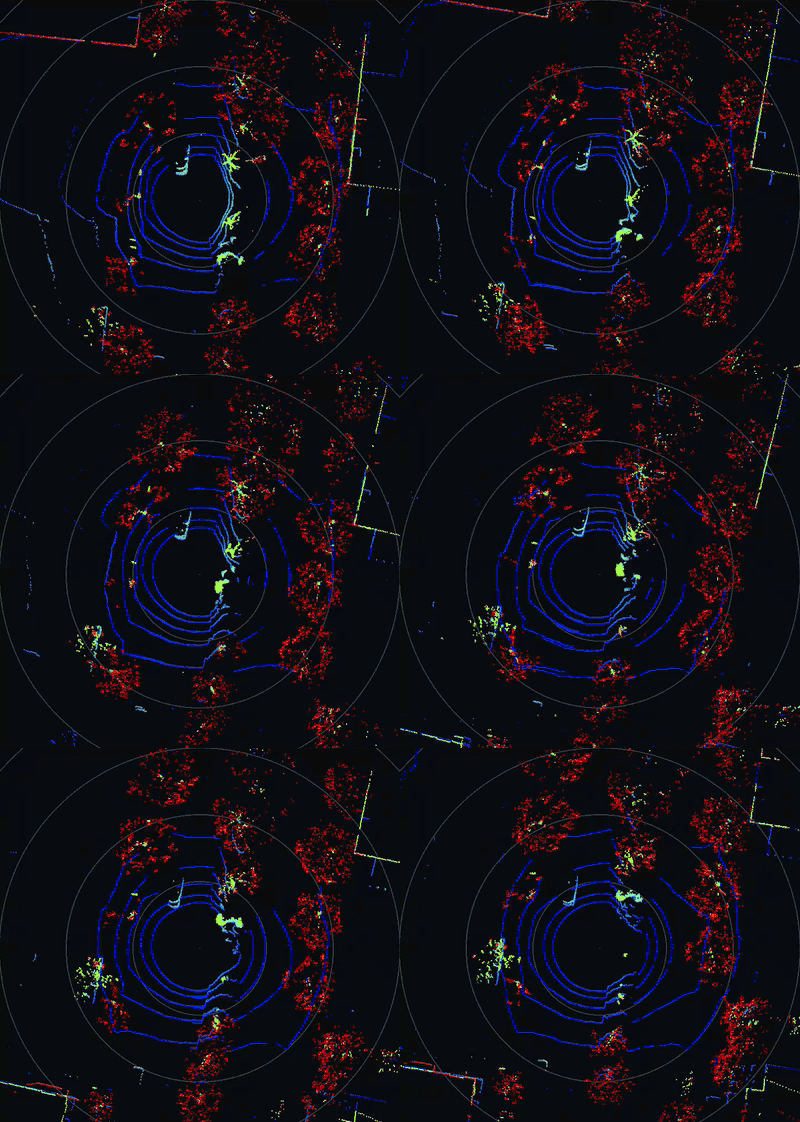
Top view of a highway recording:
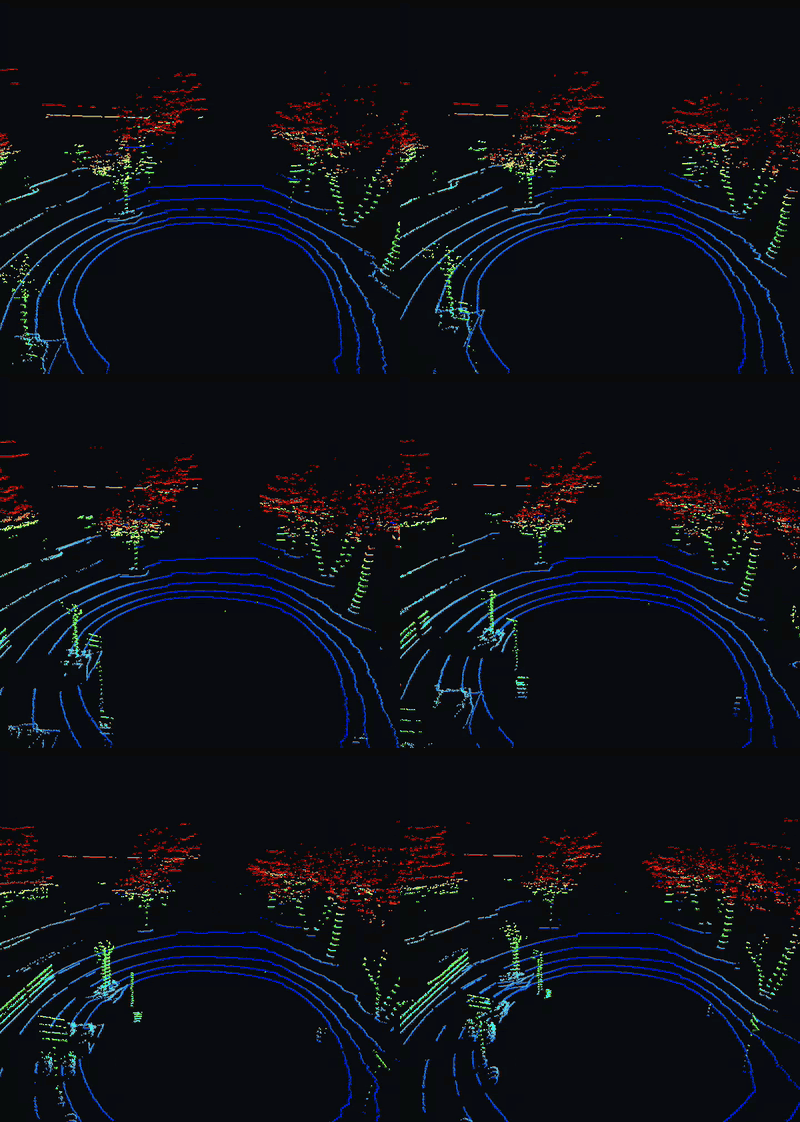
Chase view of a highway recording:
flowchart LR
    U[VlpUdpSourceOp<br/>live sensor] --> C
    P[VlpPcapSourceOp<br/>recording] --> C
    S[VlpSyntheticSourceOp<br/>tests and CI] --> C
    C[VelodyneCloudOp<br/>GPU XYZ, rolling cloud] --> R[PointCloudRenderOp<br/>top or chase view]
    R --> V[HoloViz]
Each run uses one of three interchangeable sources. They all emit the same batch of 1206-byte packets, so the rest of the graph is unchanged.
Requirements#
- Linux on x86_64 or aarch64 with an NVIDIA GPU and a compatible driver.
- Holoscan SDK 5.x Core and Sensor I/O, plus Holoscan Visualization for display builds.
- CMake 4.0+, a C++20 compiler, and the CUDA toolkit.
- Python 3.12–3.14 and the CLI pinned in the repository's requirements.txt for repository workflows.
- A packet source: a VLP-16 sensor, or a VLP-16
.pcaprecording such as the samples in Kitware's VeloView collection. No sensor?make_pcap.pywrites a synthetic recording.
Build and run#
Install the pinned CLI and select your SDK and matching development image once per shell, as described in the repository README. From the repository root:
live and live-close listen on UDP port 2368 on all interfaces by default and
accept unauthenticated datagrams. For a sensor configured to send unicast, use
--address to bind the destination address. For broadcast traffic, keep 0.0.0.0
and restrict ingress through host or container network policy; see
Live sensor and the security threat model.
holoscan run velodyne_lidar live       # VLP-16 on UDP port 2368
holoscan run velodyne_lidar live-close # live sensor, close chase view
holoscan run velodyne_lidar replay     # data/velodyne/recording.pcap, looped
holoscan run velodyne_lidar synthetic  # endless synthetic sweep, no sensor or data
holoscan run velodyne_lidar ci         # synthetic packets, headless, finite
Use --local to build and run on the host. Pass application options with
--run-args, for example --run-args='--view chase'; --run-args='--help' lists them all.
Live sensor#
Connect the VLP-16 and configure the host interface for the sensor's network as described in the VLP-16 user manual. By default the sensor broadcasts data packets from 192.168.1.201 to UDP port 2368. The sensor needs about 30 seconds after power-on before it sends packets.
Live mode binds 0.0.0.0:2368, which listens on every network interface.
To bind a local unicast address, first configure the sensor to send unicast to
that host address, then pass it to the viewer:
holoscan run velodyne_lidar live --run-args='--address 192.168.1.100'
On Linux, binding a local unicast address prevents reception of broadcast-destination
datagrams. For the sensor's default broadcast configuration, keep --address 0.0.0.0
and restrict ingress to the sensor-facing interface through host or container
network policy.
Any host that can reach the port can send packets to the viewer. Datagrams that
are not well-formed VLP-16 packets are counted and dropped. On shared networks,
restrict the port with a host firewall rule; use --address only with a matching
unicast sensor configuration. See SECURITY.md.
When running in a container, the container must be able to receive the
sensor's UDP traffic (for example, through host networking), or run with --local.
Replay a recording#
replay reads data/velodyne/recording.pcap from the repository root. No sample
is bundled or downloaded, so supply one first:
- Download a VLP-16 sample recording from Kitware's
VeloView collection.
These sample recordings are distributed alongside VeloView. VeloView software
is licensed under Apache-2.0.
Contact Kitware for further guidance on using the sample data.
Pick a VLP-16 (Puck) recording. Packets with model byte
0x22or0x21are decoded as VLP-16, because some VLP-16 recordings, including the VeloView samples, report0x21. Velodyne also uses0x21for the HDL-32E, which is not supported and would draw with the wrong laser angles. Other models are skipped. - If the file is pcapng, convert it to classic pcap with Wireshark's
editcap:editcap -F pcap input.pcapng recording.pcap. - Put the file at
data/velodyne/recording.pcapand runholoscan run velodyne_lidar replay. With the binary, pass any path with--pcap FILE.
No sample at hand? make_pcap.py writes a synthetic one:
python3 applications/velodyne_lidar/make_pcap.py data/velodyne/recording.pcap
Replay keeps the recorded packet timing and skips frames that are not VLP-16 data
packets sent to --port (default 2368); the final summary line reports the
skipped count as invalid=. If packets=0, check the sensor model and port.
Incomplete record headers or payloads terminate replay with an error.
To see what a recording contains, run vlp_inspect.py. It reports the UDP ports,
model and return-mode bytes, and whether the packet timing matches a VLP-16 (about
754 data packets/s) or an HDL-32E (about 1808/s):
python3 applications/velodyne_lidar/vlp_inspect.py data/velodyne/recording.pcap
tcpdump -nn -r FILE -c 5 'udp dst port 2368' gives a quick look at the packets too.
Views#
The SDK 5.x HoloViz operator shows images and 2D geometry layers. There is no
interactive 3D point-cloud layer, so PointCloudRenderOp draws the cloud into an
RGBA image on the GPU, colored by height, from a fixed camera:
--view top(default): plan view centered on the sensor, with range rings every 10 m.--range-msets the distance from the center to the edge (default 30).--view chase: perspective view from--eyetoward--target(meters, default0,-14,7and0,6,0; +y is the sensor's 0° azimuth).--orbit-deg-per-sslowly rotates the eye around the target.
For nearby live testing, use holoscan run velodyne_lidar live-close. This preset
uses --view chase --eye 0,-2,1 --target 0,0,0 --fov-deg 60 --point-size 3,
placing the camera about 2.2 m from the sensor and looking at its origin.
Override individual settings with --run-args, for example:
holoscan run velodyne_lidar live-close --run-args='--eye 0,-1,0.5'
--range-m only changes top-view framing; it neither zooms the chase camera nor
filters returns by distance. In chase view, move --eye closer to --target or
reduce --fov-deg to zoom in. The default chase pose is 14 m behind and 7 m above
the sensor, looking 6 m ahead.
The window cannot be rotated with the mouse. --packet-buffer-size sets how many
packets the rolling cloud keeps (default 80, about one revolution at 10 Hz).
Standalone build#
Build and run the C++ executable without the CLI:
cmake -S applications/velodyne_lidar -B build/velodyne \
  -Dholoscan_ROOT="$HOLOSCAN_SDK_ROOT" -DBUILD_TESTING=OFF
cmake --build build/velodyne --parallel
./build/velodyne/velodyne_lidar --pcap data/velodyne/recording.pcap
CUDA code is built for the GPU in the build machine (native). To build for other
GPUs, or on a machine without one, list their architectures, for example
-DCMAKE_CUDA_ARCHITECTURES="87;110". With the CLI, pass the same option through
--configure-args='-DCMAKE_CUDA_ARCHITECTURES=87;110'.
-DVELODYNE_ENABLE_VISUALIZATION=OFF removes the display dependency.
Tests#
holoscan test velodyne_lidar --no-xvfb
The suite covers packet validation and decoding, the pcap reader (including non-lidar traffic), all three source operators in host-only graphs (the UDP test sends packets over loopback), invalid arguments, the CUDA decoder against the host reference, and headless synthetic and pcap runs that render both views. GPU tests are skipped on machines without a GPU. The SDK-free pcap fixture tests also run in hosted CI.
How it works#
- A source emits batches of up to 64 VLP-16 data packets (1206 bytes, 384 laser
returns each). The UDP source's receive thread queues packets and wakes the
operator through a
NotificationSender, following the SDK'snotification_bridgeexample. VelodyneCloudOpcopies each batch to the GPU and converts the returns from spherical to Cartesian coordinates in a rolling device buffer. All work runs on the runtime's CUDA stream. Each batch emits a snapshot of the buffer.PointCloudRenderOprenders the newest snapshot at display rate (--render-period-ms, default 33).
The packet decoder is adapted from the NVIDIA DeepMap SDK. This release adds azimuth interpolation for the second firing sequence of each block.
Changes from the Holoscan SDK 2.x/4.x release#
The earlier application sources are available in the HoloHub archive-4x branch.
- DAQIRI is no longer required; live mode uses a standard UDP socket.
- The YAML configuration is replaced by command-line options.
- The 3D HoloViz point layer is replaced by fixed top-down and chase views.
- The earlier latency benchmarks no longer apply and have not been repeated.
Acknowledgements#
This application was developed in part with support from the NVIDIA nvMap team and adapts portions of the NVIDIA DeepMap SDK.